Showing posts with label Cheat. Show all posts

Friday, February 23, 2018

Rules of Survival Wallhack Chams (Undetected)

Rules of Survival Wallhack Chams (Undetected)
Working as of Feb. 23, 2018


Extract Extreme Injector 3.7.3.zip
Open Extreme Injector v3.exe
Click Start in Secure Mode, window will reopen (for undetected injection)


Click Settings

Injection Method: Manual Map
Scrambling Options: Standard
Closed on inject: Check
Stealth Inject: Check
Hide Module: Check


Open your Rules of Survival game
Select the ROS.EXE Process

Add DLL > ros_v6.dll

Inject

Type Y and Press Enter

Ready to Play :)

Continue Reading

Friday, January 1, 2010

Warcraft 3 Frozen Throne: Dota Maphack

Well, this Map Hack is from TDT_ of GamerzPlanet. I just want to share this.

This Maphack working with version 1.24, 1.23, 1.21 and 1.20e

1. Download GarenaHack TDT
2. If you dont have uncompressor, download 7zip or WinRAR.

3. Extract the GarenaHack_TDT_05-12.rar in your Garena folder.
4. Open _LoadGarena_Hack_.exe


5. Choose your Language with Portugues and English.


6. Click Register, then register to the forum that appears.
7. Put your mytdt username and password then login.


8. Then click Start Garena and its done.


Shortcut Keys:

F5 -> SuperPosition
F6 -> TradeRes
F7 -> MapHack Fog
F8 -> MapHack

Source:
GamerzPlanet
Continue Reading

Thursday, June 11, 2009

New Special Force Wallhack

I update my blog again about SF WallHack !! But again... this is not mine hahah !! I only wanted to share what I've learned by reading some forums. So first of all these 2 guys anony01981 and daryllrab8 post their SF Wall hack at www.gamerzplanet.net and I study this tutorial as fast as I can so I can share to you guys

just follow the steps.


1. Download Daemon & Sucrose
Note: If you dont have any Extractor download -> 7zip

2. Extract sucrose.zip and Install the daemon347.exe

3. After the installation, open the daemon tools


4. RIGHT click the red icon/Virtual DAEMON Manager at the left of the time
5. Click Virtual CD/DVD-ROM> Set number of devices> 1 drive


6. LEFT click the red icon/Virtual DAEMON Manager
7. Click Device 0: [ ] No media


8. Browse the sucrose.iso and open it


9. Open OMFGZ MultiDll Injector.exe


10: Choose your Dll's> Browse the sucrose.dll
11. Type in Process EXE name: "specialforce.exe"


12. Open Special Force, Login then Start Game

13. A pop-up window will appear then press "ok"


14. If OMFGZ MultiDll Injector.exe gone, LEFT click the red icon/Virtual DAEMON Manager
15. Click Unmount all drives, and its done.
Continue Reading

Saturday, October 11, 2008

Special Force Wallhack

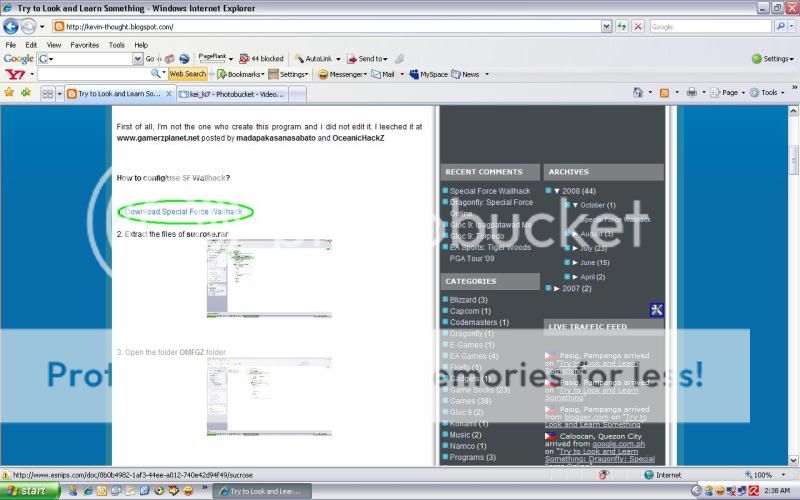
First of all, I'm not the one who create this program and i did not edit it. I leeched it at

www.gamerzplanet.net posted by madapakasanasabato and OceanicHackZ

How to config/use SF Wallhack?


1. Download Special Force Wallhack


2. Extract the files of sucrose.rar


3. Open the folder OMFGZ folder


4. Open the pink.exe and minimize it


5. Open the injector.exe


6. Change the Gunz.exe at the Box of Process EXE name: to specialforce.exe


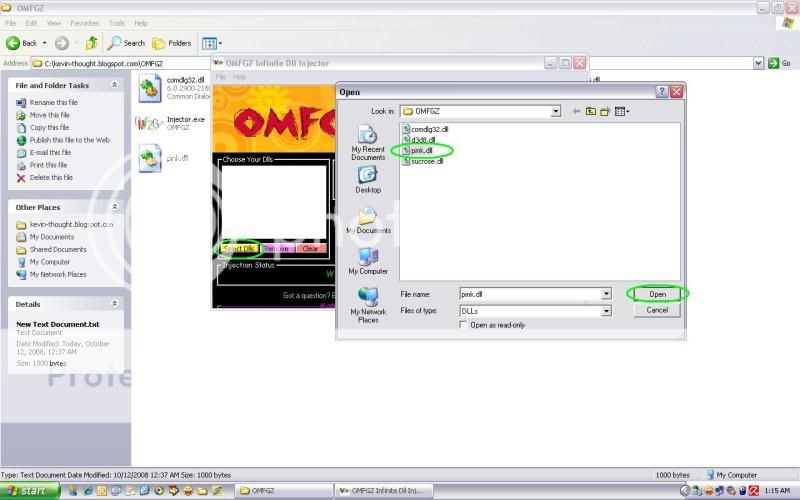
7. Click the Select Dlls at the right side and open the pink.dll


8. Open your Special Force Game(or the dflauncher.exe not specialforce.exe)
9. Put your User ID and Password then Login


10. There is a pop up, just click OK and FINISH


What is the controls for SF Wallhack?


Numpad 1 = On/Off Crosshair(Color White)
Numpad 2 = On/Off Wallhack
Numpad 3 = On/Off Fog
Numpad 4 = Fully Brightness
Continue Reading

Wednesday, April 23, 2008

WPE Pro

Winsock Packet Editor (WPE Pro 0.9a) Pro is a packet sniffing/editing tool which is generally used to hack multiplayer games. WPE Pro allows modification of data at TCP level. Using WPE Pro one can select a running process from the memory and modify the data sent by it before it reaches the destination.

It can record packets from specific processes, then analyze the information. You can setup filters to modify the packets or even send them when you want in different intervals.

WPE Pro could also be a useful tool for testing thick client applications or web applications which use applets to establish socket connections on non http ports.

Uses:

•Analyze network problems.
•Detect network intrusion attempts.
•Gain information for effecting a network intrusion.
•Monitor network usage.
•Gather and report network statistics.
•Filter suspect content from network traffic.
•Spy on other network users and collect sensitive information such as passwords (depending on any content encryption methods which may be in use)
•Reverse engineer protocols used over the network.
•Debug client/server communications.

Example Uses:

•A packet sniffer for a token ring network could detect that the token has been lost or the presence of too many tokens (verifying the protocol).
•A packet sniffer could detect that messages are being sent to a network adapter; if the network adapter did not report receiving the messages then this would localize the failure to the adapter.
•A packet sniffer could detect excessive messages being sent by a port, detecting an error in the implementation.
•A packet sniffer could collect statistics on the amount of traffic (number of messages) from a process detecting the need for more bandwidth or a better method.
•A packet sniffer could be used to extract messages and reassemble into a complete form the traffic from a process, allowing it to be reverse engineered.
Continue Reading

O2jam Gem using WPE

Note: WPE is not a virus, some Anti-Virus telling that WPE is a virus. That is not true, the Anti-Virus detect them as a virus because of the Uses of WPE is ...more

First thing to do is to download this program
>WPE Pro<
>Mirror Site<


Unzip the WPE Pro
Open WPE
Login your o2jam account
Choose any hall and join to any channel
Create a vs room and select a song that easy for you
Press Alt + Tab to return to your WPE


How To Use WPE - o2jam

Click the target and select o2.exe (the WPE taking the packets trough o2.exe)
Click View-Options- and check send only
Click the Record button (left side)
Then go back to o2jam and Play
When you are done Play it once
Press Alt + Tab again and go to your WPE
Stop the recording
Look for packet sized 23(there should be only one 23)
Right click and Select add to Send list
Right click again and Select Send list with this packet ID
Click on send at the filter corner
Then Check the box
Then Click the New send
Then Click the Pencil icon

Then edit the packet like this 00000000 17 00 B0 0F 9D 00 00 00 00 00
FF FF FF FF FF F9 00000010 FF FF FF FF FF 00 FF(don't edit your cool packet the cool packet is the 9D 00 but this is not only the cool packet
if your cool is not like 9D 00 it is ok you are right don't edit the
cool packet)

Then click ok
Then click the record icon that is color black
Then send it continuously and click ok
After that go back to your o2jam then play again the song you Play
But it can be use this in to other song,
I advice to do this in Training Mode
Continue Reading
 

About Me

Site Info

PageRank Checking Icon
eXTReMe Tracker

Kevin Thought Copyright © 2009 Community is Designed by Bie Blogger Template